How to Avoid Emails Going to Spam? - Key Strategies, Reasons & Definition
Struggling with deliverability-related challenges & want to avoid emails going to spam in each campaign? Follow our 10 critical strategies to stay out of the spam folder & reach prospects in an easy, fuss-free manner.
Cleverviral
·
February 29, 2024
·
12 min
Navigating the world of cold emails can feel like walking through a minefield, especially with the ever-watchful eyes of spam filters. These digital gatekeepers are getting smarter by the day, thanks to the relentless efforts of Email Service Providers (ESPs) to fend off spam, phishing, and all sorts of unwanted emails.
While these spam filters are useful for catching unwanted bulk messages, ESPs might also end up blocking legitimate emails and preventing you from reaching the prospect’s primary inbox.
As a B2B salesperson, figuring how to avoid emails going to spam becomes crucial. Over the course of this article, we’ll explore the reasons behind your messages landing in the spam folder, and also suggest strategies to counter this problem.
So, let’s get started.
What are spam filters?
Before we explore the tactics to avoid emails going to spam, it’s important to understand what causes this problem – something that’s down to spam filters put in place by the ESPs.
At their core, spam filters are the gatekeepers of your mailbox that shield users from unsolicited, potentially harmful content. These programs scrutinize incoming emails for spammy characteristics to determine their fate, eventually directing them to the primary inbox or the spam folder.
The level of sophistication in each email spam filter though varies, with some of the common ones being:
Header filters which scrutinize the email's metadata (header area) for anomalies.
Content filters that analyze the email's text and images for spam indicators. They often check your emails for spam trigger words, malicious file attachments & even refined HTML code snippets.
Rule-based filters that operate on predefined criteria set by the users, including spam triggers for specific senders, having specific terms in the subject line and so on.
Blacklist filters usually reject emails from senders listed on spam databases.
Challenge-response filters require senders to perform a task proving they're human (say undertake the ‘CAPTCHA’ or using double opt-in)
Permission filters are tasked with blocking emails that are not explicitly allowed by the receiver.
Gateway filters serve as the first line of defense, usually scanning emails at the network's entry point.
Lastly, hosted filters are third-party services providing spam filtering to clients. They usually use content & reputation as the key factors to assign a spam score to your emails.
When it comes to Gmail, the Gmail spam filter is particularly adept at identifying and sidelining spammy, non-personalized emails.
It utilizes a dynamic set of criteria, including:
Sending emails to users who haven’t opted-in for your email list
Having blacklisted emails or IP addresses
Using spam trigger words across both the subject line and body content
Non-trustworthy links inside the email
Having a poor sender reputation
Mixing different types of content in the same email
Impersonating other domains and so on.
Why are my emails going to spam?
To avoid emails going to spam, it’s important to first understand why that’s happening. Navigating through the complexity of email deliverability, marketers often wonder why their cold emails land up in spam.
This usually happens due to the following factors:
Unengaged recipients: Continuously sending emails to recipients who do not open or interact with your messages can tarnish your sender reputation, signaling to ESPs that your emails may not be welcomed.
Emails with spam trigger words: The overuse of certain keywords and phrases typically associated with spam can activate filters, leading to immediate flagging of your email as spam.
Inconsistent sending patterns: Sudden bursts of email activity, especially in large volumes, can raise suspicion among ESPs, potentially marking your emails as spam.
Generic, non-personalized emails: In today's digital age, personalization is key. Emails that lack a tailored approach are more likely to be dismissed by recipients and flagged by spam filters.
Poor email list hygiene: Neglecting to clean your email list of inactive or invalid addresses can negatively impact your deliverability rates.
Non-compliance with email regulations: Failing to adhere to legal requirements, such as the inclusion of an unsubscribe option, can not only lead to spam flagging but also legal repercussions.
Misleading subject lines: Subject lines that promise one thing but deliver another can frustrate recipients and lead to higher spam complaints. Transparency and clarity in your subject lines ensure that recipients know what to expect from your email, reducing the likelihood of disappointment and spam marking.
Key Strategies to Avoid Emails Going to Spam: A Closer Look
Now that you’ve figured out how email spam filters work & the reasons your email might be landing in spam, it’s time to explore strategies that allow you to avoid emails going to spam.
Here are some key strategies to avoid emails going to spam, based on our own experiences managing cold emails for clients over the last year and half:
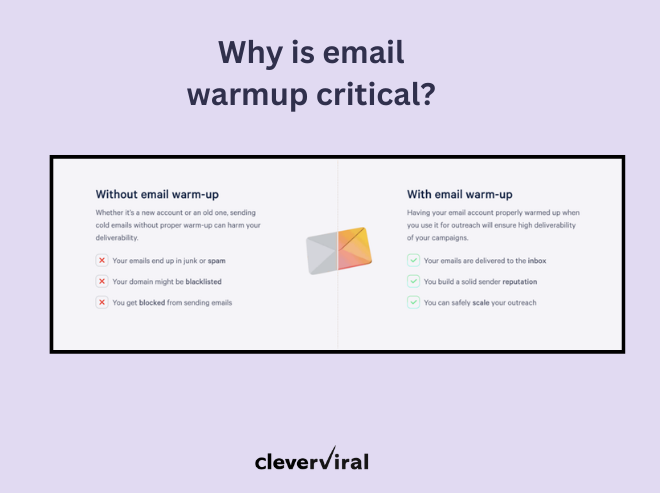
1. Warmup your emails
One of the biggest mistakes people make when sending out cold emails for the first time is to not warm up their emails. To avoid emails going to spam, make sure you’re spending enough time warming up your emails.
When starting out, focus on warming up the email accounts over 2 to 4 weeks so as to establish your IP & domain as trustworthy senders. You can start off by sending 5 to 10 emails in week 1 for testing and then monitor how the initial set performs.
If these emails don’t trigger spam filters or lead to high unsubscribe rates, you can easily increase the frequency of your emails.
One of the major highlights of the Gmail email spam update this year is the fact that senders need to add an ‘Unsubscribe’ link to their emails, allowing users to instantly remove themselves from the sender’s list.
Not doing this can hurt deliverability, apart from affecting your domain reputation & campaign performance.
3. Choose the right domains & TLDs
One key component most people forget when it comes to passing spam filters is their choice of domains & TLDs. To avoid emails going into spam, make sure you're only choosing normal, widely-used domain extensions like ‘.com’, ‘.co.uk’ and so on.
In situations where the above aren't available, stay away from the more exotic ones & rather opt for something like ‘.co’ or ‘.io’ among others.
4. Setup proper email authentication
Now this is one of the most basic, but highly important strategies to avoid emails from going to spam. The likes of SPF, DKIM and DMARC authenticate your credentials as a legitimate email sender & also help prevent spam, phishing and other online attacks.
While the DMARC protocol isn't mandatory, it is critical to improving deliverability by a notch and should be authenticated properly before sending cold emails.
Apart from these, one must not forget about the PTR records either, since ISPs use them to verify a sender’s identity. In case you don’t have it, chances are that your emails might end up in spam.
5. Focus on personalizing every email
With the advent of AI & changing spam policies across major sending platforms, personalization is your key to staying out of spam and landing in the primary inbox.
Now personalization doesn’t end at just {{firstName}} & {{CompanyName}}. It's also about personalizing your message to each unique prospect. Doing this will make them believe that you’ve done your research & they aren’t just another prospect in a mass prospecting list.
Apart from the subject line, you can personalize the:
Email body
CTA
And even the email signature
Social media activity
Company technology stack
Website activity
6. Adhere to prevalent spam laws
Make sure your emails adhere to the CCPA & GDPR laws. These are email protocols that protect the customers’ inboxes. In addition to this, the likes of CAN-SPAM Act define what a spam email is, and recommend certain guidelines that must be followed when undertaking email communication.
Here are a few general guidelines that you must adhere to when sending cold emails:
Do not send emails without the user’s permission
Have a mailing address while sending your message
Do not have a misleading subject line
Offer easy ‘Unsubscribe’ options.
7. Refrain from using link or open tracking
Most cold email platforms help you track metrics like the open rate, CTR, reply rates & even the unsubscribe rates. That being said, the likes of open rate & CTR often rely on tracking links and pixels that are added to your cold emails.
ESPs often scan your email content when they’re received inside the prospect’s inbox. In case there are any hidden links or pixels, the spam filters might get activated – eventually pushing you to ‘spam’. To avoid emails going to spam, you must refrain from using link or open tracking.
After all, from a B2B perspective, what matters most is the number of people who actually respond to your emails & engage in a conversation. Make sure to focus on that rather than spending time on additional stuff that might not directly affect the success of your campaigns.
8. Verify your email list
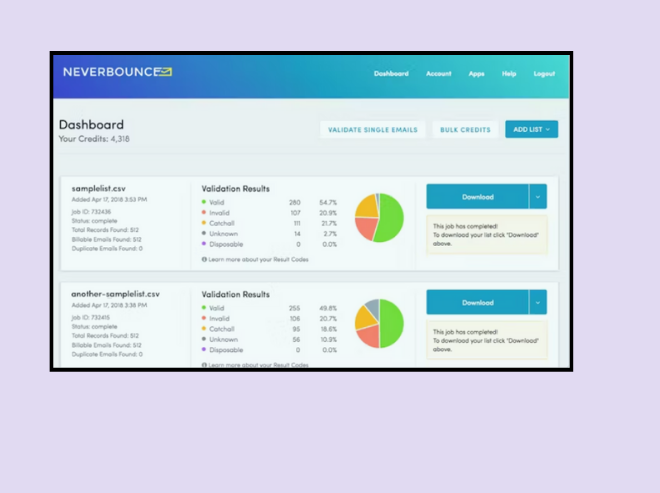
To avoid emails going to spam, it’s important to verify your email list for bounced or invalid emails. If the ESP notices a high proportion of emails having this problem, you’ll end up being sidelined by the spam filters.
To counter this, you can use a tool like NeverBounce which can easily verify prospect emails before you load them up for sending.
9. Start with a lower sending volume
Another key strategy to avoid emails going to spam is to maintain a lower sending volume at the start. The idea should be to send a minimum of 150 emails per day per email address & domain for starters – in order to maintain the sending reputation & deliverability.
That being said, if you want to send a higher volume, make sure:
Buy different domains
Have at least one email per domain
Have positive engagement rates in each of these emails and warm them up properly.
10. Use the right outreach tools
The choice of cold email tools you use also impacts the deliverability of your emails. To avoid emails going to spam, it’s important that you choose an email sending platform that strengthens your sender reputation, while also providing step-by-step handholding when it comes to avoiding email spam traps.
It is for this reason that we recommend using Smartlead, which not only allows you to have unlimited mailboxes, but also handles large-scale outreach efficiently.
Apart from automated follow-ups, auto-rotating email accounts & AI-powered email warmups, the tool also facilitates multichannel outreach at scale.
Final Thoughts
Deliverability isn’t just another item on your to-do list; it's the linchpin of your outreach efforts. With the Gmail spam update already in motion, the above strategies won’t just help you avoid emails going to spam, but also ramp up your outreach performance.
This is the exact problem we’re solving with Cleverviral's deliverability consulting solutions. They’re tailored to not only improve your email performance, but also to wade through challenges like spam updates & policy developments.
With our expertise, you can be sure of landing in the prospect’s primary inbox, every single time! So if this is something you’re currently facing challenges with, simply shoot us an email on hi@cleverviral.co or fill out the form on our website.
Free POC
Reading about outbound isn't running it. Want us to run yours?
Apply below. If we're a fit, we run a real pilot on your ICP and show you the actual replies before you commit to anything.