Beginner’s Guide to Inbox Placement Testing for Cold Emailing - [All You Need to Know]
Inbox placement is a critical aspect of email deliverability & cold email success. Learn what it is about & key strategies to optimize inbox placement in our article.
Cleverviral
·
February 11, 2025
·
12 min
Let’s be real—cold email is a numbers game, but if your emails aren’t even making it to the primary inbox, you’re losing before you even start. You could write the best pitch ever, personalize it perfectly, and have an irresistible call-to-action—but if it lands in spam or the promotions tab, none of it matters.
That’s why inbox placement is such a big deal. It’s not just about deliverability (which means your email was accepted by the recipient’s email provider)—it’s about ensuring that your message actually lands where your prospect will see it.
And here’s the kicker: email service providers (ESPs) like Gmail and Outlook don’t make this easy. They use complex filtering algorithms that decide whether your email deserves a place in the primary inbox, or if it’s destined for spam or the promotions tab.
So in this article, we’re going to break down everything you need to know about inbox placement—what it is, why it matters, and, most importantly, how you can get your cold emails opened, read, and replied to.
Plus, we’ll walk you through different inbox placement tests and strategies to make sure you’re landing in the right place every time.
What does inbox placement mean?
If you’ve ever sent out a cold email campaign and wondered why your response rates are low, the answer often lies in inbox placement.
At its core, inbox placement refers to where your email lands within the recipient’s inbox. It’s not enough for your email to be delivered—you need to make sure it ends up in the primary inbox, not the spam folder, promotions tab, or updates folder.
But is email deliverability and inbox placement the same?
Now, many people confuse email deliverability with inbox placement, but they’re not the same thing. How?
Well, here’s a quick overview of both concepts:
→ Email deliverability implies that your email successfully reached the recipient’s email server (i.e., it wasn’t blocked or bounced).
→ Alternately, inbox placement determines where that email actually lands within the inbox—Primary, Promotions, Updates, or Spam.
For cold emailers, inbox placement is everything. If your emails don’t reach the primary inbox, the chances of them being opened, read, and replied to drop significantly.
As a salesperson, your primary goal is simple:
✅ Make sure your email lands in the primary inbox – where it has the highest chance of being seen, read, and replied to.
❌ Avoid the spam folder, promotions tab, or other secondary folders – where your email is either ignored or deleted.
Even if your email gets delivered (meaning it didn’t bounce), that doesn’t mean it’s reaching the primary inbox. If your email lands in spam or promotions, your chances of getting a response drop significantly.
Now, you might be wondering—who decides where my emails land? The answer: 2 key entities control your inbox placement: the ESPs (with their algorithms) and the end-user.
The likes of Gmail, Outlook, Yahoo, and Zoho don’t just randomly decide where to place your email. They use complex AI-driven algorithms to analyze every incoming email and categorize it into different folders inside the user’s inbox, including:
The primary folder
The ‘Promotions’ tab
The ‘Updates’ tab
The spam folder
In addition, users can also influence the categorization of emails, with the following actions causing ESPs to categorize your email in the above folders:
✔ Marking Emails as Important – If users frequently move your emails to the primary inbox, ESPs recognize them as valuable. ✔ Replying to Emails – Replies signal to ESPs that your emails are wanted, increasing your inbox placement rate. ✔ Deleting Without Opening – If too many recipients ignore your emails, ESPs will assume they are unimportant. ✔ Marking Emails as Spam – If users repeatedly flag your emails as spam, your future emails will go straight to spam for everyone.
Essentially, every action taken by the recipient trains ESPs to categorize your future emails accordingly. As an email marketer, you must focus on optimizing your email list for increased engagement.
Why Do You Need to Track Inbox Placement?
Now that you’re aware of what inbox placement means, here are a few more reasons to help you figure why tracking inbox placement for your company is a non-negotiable:
1. Low open rates = Low conversion rates
If your email lands in spam, your open rates take a nosedive—and if no one sees your email, no one can respond. Low open rates mean low conversions, which means wasted effort.
2. Bad sender reputation
ESPs track how recipients interact with your emails. If too many of your emails are ignored, deleted, or marked as spam, your sender reputation tanks. Once that happens, even warm emails start landing in spam.
3. Increased costs
Cold email tools and lead databases cost money. If you’re sending hundreds or thousands of emails that never reach inboxes, you’re burning cash with zero ROI.
4. Decreased customer satisfaction
If your emails do get delivered but land in spam, you might seem like an untrustworthy sender. No one wants to do business with a company that looks shady.
What is Inbox Placement Rate? (And How to Calculate It…?)
Inbox placement rate is amongst the most critical metrics in cold emailing — telling you how many of your sent emails are actually landing in the primary inbox versus getting buried in spam or the promotions tab.
Many people focus only on email deliverability (how many emails successfully reach the recipient), but that’s just half the battle. What really matters is whether your emails are landing in a place where they can be seen, opened, and responded to—this is what the inbox placement rate measures.
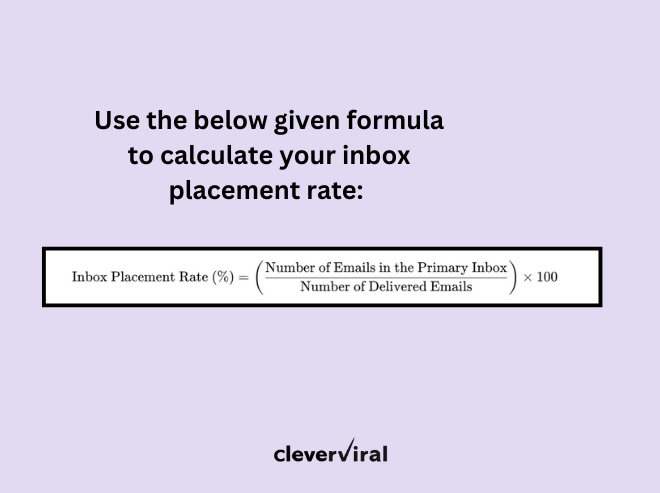
But how do you really calculate your inbox placement rate? Simply use the following formula:
Let’s break this down with an example:
You send out 600 cold emails
550 of them were delivered successfully (meaning they didn’t bounce)
Out of those 550, only 350 land in the primary inbox—the rest are filtered into spam, promotions, or other folders.
Now, applying the formula, we get the following:
(350/550 x 100) = 63.64%
There’s no universal benchmark for a "perfect" inbox placement rate because it depends on multiple factors, including:
✅ Your sending domain – Newer domains usually have lower inbox placement rates until they build credibility.
✅ Your email content – Spammy words, too many links, or a poorly formatted email can hurt placement.
✅ Your engagement rate – If recipients open and reply to your emails, ESPs are more likely to send future emails to the primary inbox.
✅ Your sender reputation – If your emails frequently get flagged as spam, your placement rate will decline over time.
That said, here’s a general guideline for assessing your inbox placement rate:
80% or higher → Excellent – Your emails are reaching the primary inbox consistently.
70-79% → Decent, but needs improvement – You’re still getting some emails in spam or promotions.
Below 70% → Poor – A large percentage of your emails are being filtered, and you need to take action.
If your inbox placement rate is below 70% (like the above example we just shared), you’re leaving money on the table because your emails aren’t getting seen.
That being said, if you want to check out industry-specific numbers on inbox placement, you can take a look at the 2023 “Email Deliverability Benchmark” report by Validity, a renowned data intelligence firm.
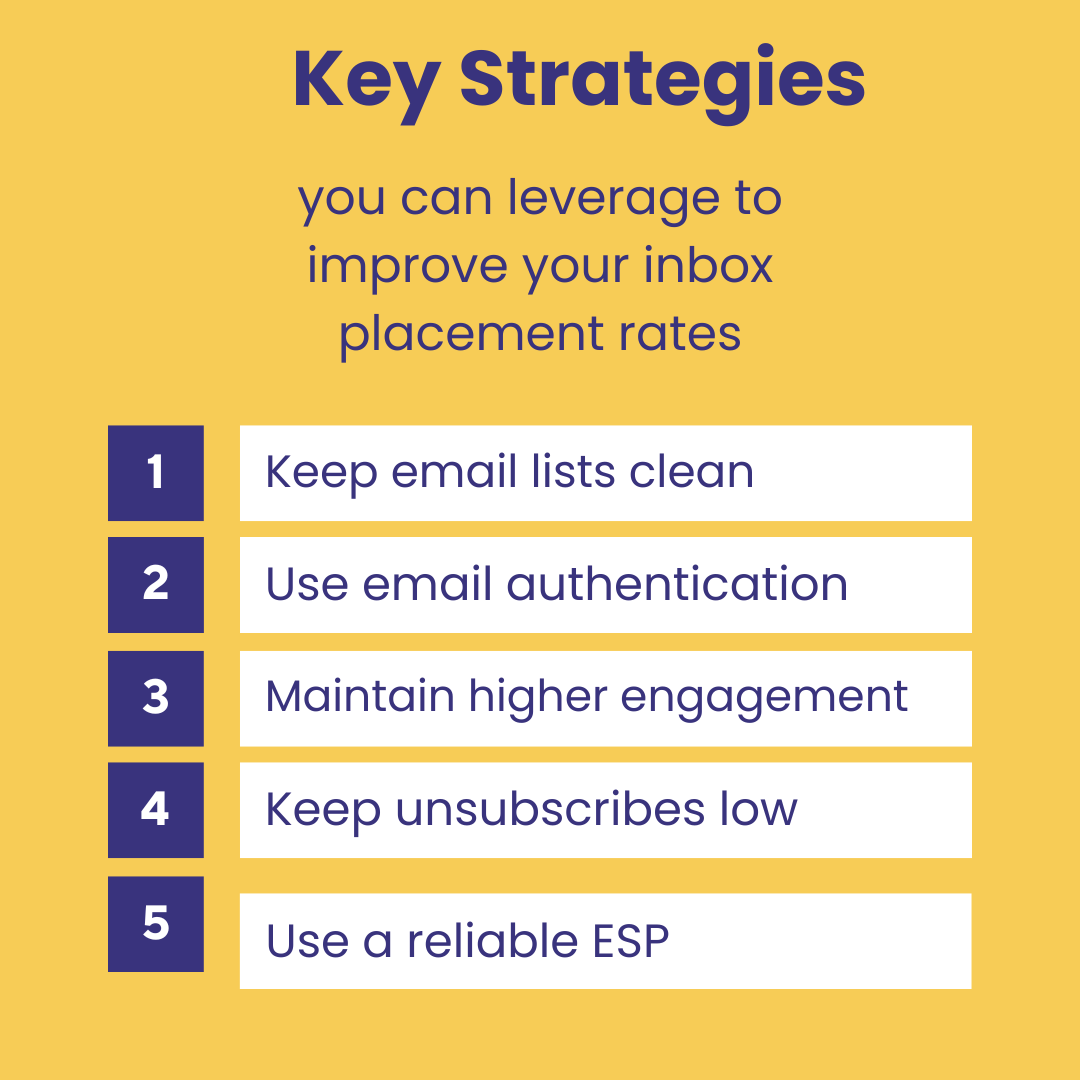
Key Strategies to Improve Inbox Placement Rates
Achieving optimal inbox placement is crucial for the success of your email campaigns. Here are a few key strategies to enhance your inbox placement rate:
1. Keep email lists clean and validated
Maintaining a clean email list is fundamental to ensuring your messages reach the intended recipients' primary inboxes. Here's how to do it:
Regularly remove invalid and inactive email addresses: Sending emails to outdated or incorrect addresses can lead to high bounce rates, which negatively impact your sender reputation. According to Mailgun, prioritizing list hygiene helps maintain a good sender reputation with mailbox providers like Gmail, Yahoo Mail, and Outlook.
Use email verification tools: Implementing tools like ZeroBounce or NeverBounce can help identify and eliminate invalid emails, reducing the risk of hitting spam traps. As per Clearout, validating and cleaning your email lists regularly will ensure you stay away from all the bad emails and get closer to good email inbox placement.
Avoid purchasing email Lists: Acquiring email lists from third parties often results in low engagement rates and higher spam complaints, as recipients may not have consented to receive your emails. Building your list organically ensures that your subscribers are genuinely interested in your content, leading to better engagement and improved inbox placement.
2. Leverage email authentication
Implementing proper email authentication protocols is essential for verifying your identity as a sender and building trust with Email Service Providers (ESPs). Key protocols include:
Sender Policy Framework (SPF): This protocol allows the domain owner to specify which mail servers are permitted to send emails on behalf of the domain.
DomainKeys Identified Mail (DKIM): DKIM adds a digital signature to your emails, enabling recipients to verify that the email was indeed sent and authorized by the domain owner and that it hasn't been altered during transit.
Domain-based Message Authentication, Reporting & Conformance (DMARC): DMARC builds upon SPF and DKIM by providing a way for domain owners to publish policies on how unauthenticated emails should be handled, offering an additional layer of protection against spoofing and phishing.
According to Mailmodo, implementing these authentication protocols is crucial for a sender, as it shows the recipient's server that your email is from a verified source, thereby improving your chances of reaching the inbox and not the spam folder.
3. Maintain high engagement rates
Engagement metrics are a significant factor that ESPs consider when determining inbox placement. To keep your engagement rates high:
Send relevant and valuable content: Ensure your emails provide value to the recipients, addressing their needs and interests. Personalized content can lead to higher open and click-through rates.
Optimize send frequency: Finding the right balance in email frequency is crucial. Sending too many emails can lead to subscriber fatigue and increased unsubscribes, while infrequent emails may result in low engagement.
Encourage interaction: Including clear calls-to-action (CTAs) and interactive elements like polls or surveys can boost engagement. Mailmodo suggests that regularly monitoring key email metrics like open rates, click-through rates (CTR), bounce rates, unsubscribe rates, spam complaints, and conversion rates can help in maintaining good engagement.
4. Keep unsubscribes and spam complaints low
Minimizing unsubscribes and spam complaints is vital for maintaining a positive sender reputation. Strategies include:
Set clear expectations: Inform subscribers about the type and frequency of emails they will receive during the sign-up process.
Provide an easy unsubscribe option: Making it simple for users to opt-out reduces the likelihood of them marking your emails as spam.
Segment your audience: Tailor your content to different subscriber segments based on their preferences and behaviors to ensure relevance.
According to Upland Software, minimizing spam complaints is crucial, as regular complaints can lead inbox providers to hesitate to put your email in the inbox.
5. Use a reliable Email Service Provider (ESP)
Choosing a reputable ESP can significantly impact your inbox placement rates. Consider the following when selecting an ESP:
Deliverability rates: Opt for providers known for high deliverability rates and strong relationships with major ISPs.
Compliance with best practices: Ensure the ESP follows industry standards and best practices for email sending.
Advanced features: Look for features like list segmentation, A/B testing, and detailed analytics to optimize your campaigns.
By implementing these strategies, you can enhance your inbox placement rate, ensuring that your emails reach your audience's primary inboxes and achieve better engagement.
How Often Should You Test Inbox Placement?
If you’re serious about cold email success, inbox placement testing shouldn’t be an afterthought—it should be a regular part of your strategy. Even if your emails are currently landing in the primary inbox, that doesn’t mean they’ll stay there forever.
Inbox placement rates fluctuate based on changes in ESP algorithms, recipient behavior, and your own email-sending patterns.
So, how often should you test inbox placement? Ideally, before and during every major campaign adjustment. Here are the key scenarios where inbox placement testing becomes crucial:
Scenario 1: When launching new campaigns
Before scaling a new cold email campaign, you must test inbox placement to avoid mass emails landing in spam. New subject lines, templates, and audience segments can impact inbox placement rates differently.
Running email placement tests ensures that your emails reach the right folder before sending them at scale. You can leverage seed lists or inbox placement testing tools to check where your emails land before launching.
Scenario 2: When expanding your subscriber list
New leads have different filtering behaviors, and ESP algorithms may treat first-time senders cautiously. Some email domains (e.g., @gmail.com vs. @company.com) handle messages differently, affecting inbox placement rates. Unengaged recipients can lower email deliverability, increasing the risk of spam placement.
In this scenario, after adding new leads – simply test inbox placement before scaling to ensure your emails land in the primary inbox.
Scenario 3: When you have large subscriber list
A large email list often includes inactive or unengaged recipients, which can hurt your sender reputation and reduce inbox placement rates. Regular email placement tests help identify whether emails are consistently reaching active subscribers' inboxes or getting filtered.
You can segment your list, look at removing inactive subscribers and test inbox placement periodically to maintain deliverability.
Scenario 4: When your ESP releases a new update
ESPs like Gmail, Outlook, and Yahoo frequently update their spam filtering algorithms, which can shift your inbox placement rates. These updates may tighten filtering criteria, causing more emails to be flagged as spam or moved to promotions.
You must test inbox placement in this scenario, checking whether your emails are still landing in the primary inbox or not.
Scenario 5: When there’s a drop in engagement rate
A decline in open rates, click-through rates, or replies can indicate that your emails are not reaching inboxes. If emails are consistently ignored or marked as spam, ESPs will deprioritize them, negatively impacting your inbox placement rate.
In that context, if engagement drops by 10-20%, you can conduct an inbox placement test to identify whether emails are being filtered and adjust your strategy accordingly.
Key Methods for Inbox Placement Testing – [A Closer Look]
Ensuring your emails land in the primary inbox isn’t a guessing game—it requires structured inbox placement testing. There are several effective methods to analyze and improve your inbox placement rate, helping you avoid spam folders and increase engagement.
Some of them are given below:
1. Seed list testing
A seed list test is one of the easiest ways to check inbox placement before sending out a full campaign. This method helps you see exactly where your emails are landing across different ESPs.
→ How to do it: ✅ Create a small seed list of test email addresses from major ESPs like Gmail, Yahoo, and Outlook. ✅ Send a test email to these addresses. ✅ Check whether your email lands in the primary inbox, promotions tab, or spam folder. ✅ Take note of any issues and adjust your email content, structure, or sending patterns based on the results. ✅ Re-run the test regularly to track changes and maintain high inbox placement rates.
→ Why it works: It helps you understand how different ESPs categorize your emails before launching a campaign.
2. Engagement tracking
The second inbox placement testing method focuses on tracking how recipients interact with your emails. If the engagement rates drop, ESPs may start diverting your emails to spam.
Here’s how you can leverage engagement tracking to optimize your inbox placement:
→ How to do it: ✅ Send your emails as you normally would ✅ Track key engagement metrics like open rates, click rates, and unsubscribe rates ✅ Identify sudden drops in engagement, which could signal a deliverability issue ✅ If a particular segment has low engagement, it may indicate poor inbox placement—adjust content, subject lines, or sending frequency accordingly ✅ Keep refining your email strategy based on engagement data.
→ Why it works: ESPs prioritize emails that get high engagement. The more your emails are opened and clicked, the more likely they are to land in the primary inbox.
3. Inbox placement monitoring
If you want a hands-off approach to tracking your inbox placement rate, you can use specialized monitoring services that automatically test deliverability across different ESPs.
→ How to do it: ✅ Use an inbox placement monitoring tool (like GlockApps, MailTester, or MXToolbox) to send test emails to real mailboxes ✅ Monitor inbox placement rates across major email providers ✅ Compare your deliverability with industry benchmarks to see where you stand ✅ Identify any ESP-specific placement issues (e.g., Gmail may be marking your emails as spam while Outlook delivers them to the inbox) ✅ Continuously optimize your email content, sender reputation, and engagement strategy to improve inbox placement.
→ Why it works: This method provides real-time insights into your email performance across different providers, making it easier to fix inbox placement issues.
4. Spam filter testing
Spam filters are designed to block unwanted emails, but sometimes even legitimate emails get flagged. Testing your emails against spam filters ensures they aren’t mistakenly classified as spam.
→ How to do it: ✅ Use a spam testing tool (like MailGenius, Mail-Tester, or SpamAssassin) to analyze your email. ✅ Review your spam score and any elements that could be triggering ESP spam filters. ✅ Make adjustments to email content, subject lines, and formatting to avoid common spam triggers. ✅ Re-test after making changes until your spam score is low and inbox placement is optimal.
→ Why it works: Avoiding spam triggers improves your inbox placement rate and helps build a positive sender reputation.
5. Content & subject line analysis
Your email content and subject line play a huge role in where your email lands. ESPs scan emails for relevance, tone, and engagement potential before deciding placement.
→ How to do it: ✅ Review your email content—ensure it provides real value, avoids overly promotional language, and sounds natural. ✅ Optimize your subject lines—make them compelling without using spammy phrases like “Hurry now!” or “Free money.” ✅ Preview how your email appears across different ESPs and devices (mobile, desktop, webmail) to ensure proper formatting. ✅ Make adjustments based on feedback and re-test to improve inbox placement.
→ Why it works: Well-structured, engaging emails are more likely to be delivered to the primary inbox rather than promotions or spam.
Optimize for Inbox Placement & Scale Your Campaigns with Cleverviral!
If your inbox placement is poor, your entire cold email strategy falls apart. The good news? You can fix it with the right tactics. By partnering with a specialized deliverability expert like Cleverviral, you get custom-tailored solutions and an optimal inbox placement strategy that ensures your emails land in the primary inbox – every single time!
If you’re looking out for help with email deliverability & inbox placement testing for your outbound campaigns, reach out to us on hi@cleverviral.co or simply fill out the form on our website!
Free POC
Reading about outbound isn't running it. Want us to run yours?
Apply below. If we're a fit, we run a real pilot on your ICP and show you the actual replies before you commit to anything.