Complete Email Deliverability Checklist To Skyrocket Your Outbound in 2025
Deliverability is key to outbound success. Learn how you can leverage a comprehensive email deliverability checklist to ramp up your cold email performance like a pro.
Cleverviral
·
February 21, 2025
·
12 min
Email deliverability has always been a crucial piece of the outbound puzzle, but in 2025, it's make-or-break for your cold email campaigns. The rules of the game have changed—ESPs (Email Service Providers) like Gmail and Outlook have cracked down harder on high-volume sending, and new spam filters have made it tougher than ever to land in a prospect’s inbox.
If you're still relying on outdated tactics, you’ll see open rates plummet, emails landing in spam, and your sender reputation tanking beyond repair. This is why having a strict email deliverability checklist is non-negotiable. Following best practices doesn’t just keep you out of spam—it ensures your emails get seen, opened, and responded to.
In this article, we’ll be covering everything you need to know about email deliverability, alongside the importance of following deliverability best practices to skyrocket your outbound campaigns.
So let’s get started.
Why Do You Need an Email Deliverability Checklist?
Imagine spending hours crafting the perfect email—hyper-personalized first line, clear and concise offer, and a non-salesy CTA—only to have it land in spam or worse, get blocked altogether.
This is the reality for many businesses that don’t actively manage their email deliverability best practices. Inboxes are stricter, engagement-based filtering is more aggressive, and one wrong move can put your entire domain on a blocklist.
A cold email deliverability checklist helps mitigate these risks by ensuring:
✅ Your emails avoid spam traps.
✅ Your domain and inbox reputation stay intact.
✅ Your campaigns maintain high open and reply rates.
By implementing deliverability best practices covered later on in the article, we can ensure that your emails reach the right prospects while also safeguarding your domain reputation.
Why is it Important to Improve Email Deliverability?
Before we jump onto the email deliverability checklist, it's crucial to understand the importance of deliverability as a concept. In simple terms, having a sub-optimal deliverability rate can have an adverse impact on your business.
If your emails aren’t reaching inboxes, you’re not just losing potential deals, but also actively damaging your sender reputation – which makes it harder to reach out to future prospects.
Ignore the deliverability best practices, and here’s what usually happens:
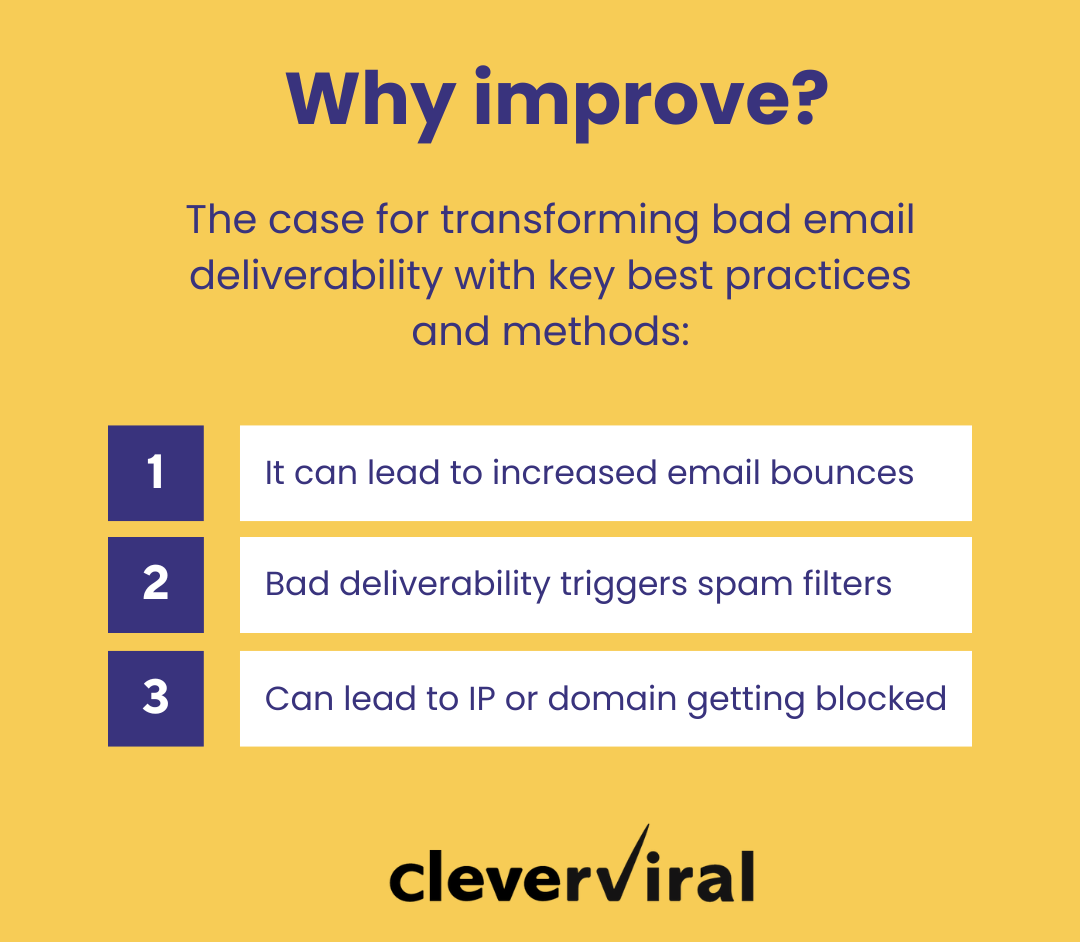
Email bounces increase: If your emails fail authentication or reach invalid addresses, they will bounce back, damaging your domain reputation.
Spam filters get triggered: ESPs monitor engagement metrics. If recipients ignore, delete, or mark your emails as spam, future emails will land in spam folders.
Your IP or domain gets blocked: Repeated bad practices can get your domain flagged, leading to blacklisting on services like Spamhaus.
Moreover, with the likes of Gmail and Outlook using AI-powered filtering and adapting to sender behavior, a poor track record can be a death knell for your email’s inbox placements.
It’s clear, fixing a bad reputation is much harder than preventing issues in the first place. As a cold emailer, email deliverability optimization should be a core part of your outbound strategy from day one.
But what is it? And what all do you need to do? – Let’s find that out in the next section.
Email Deliverability Checklist for 2025 – All Key Elements You Need to Consider
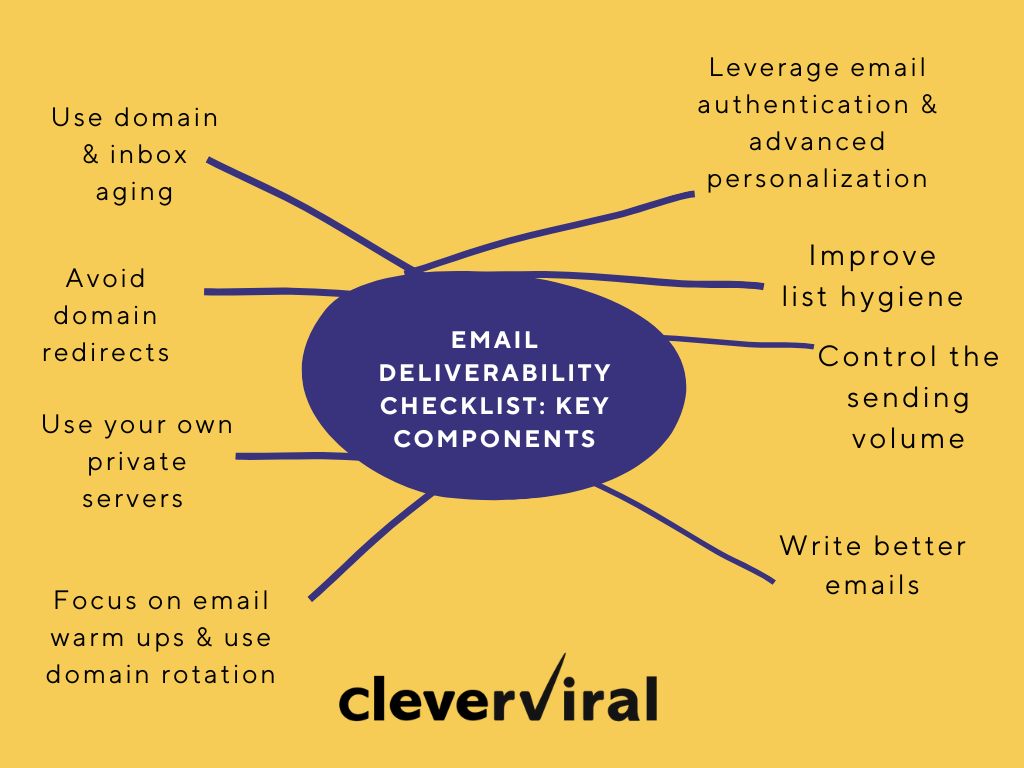
Now that we’ve covered the basics of deliverability & its optimization, here’s a detailed breakdown of the email deliverability checklist for your outbound campaigns in 2025:
1. Domain & inbox aging
The first step in the email deliverability checklist involves using domain & inbox aging – a process which refers to the age of the domain you’re sending emails from, which has a direct impact on how the ESPs view and treat your cold emails.
Newer domains are typically associated with spammers or less credible senders. If you skip the domain aging step, you risk triggering ESPs’ email deliverability best practices designed to protect users from potential spam.
Aging a domain works similarly to building trust with a reputation. Over time, ESPs recognize that a domain that has been in use for an extended period, without issues, is more reliable.
As such, it's vital to establish your domain’s reputation by gradually ramping up email activity.
Here’s how you can ensure the aging process is done right:
Start with 2-3 domains minimum: Having multiple domains allows you to test and gradually warm up different inboxes, ensuring that if one domain encounters any issues, the others remain unaffected.
Age them for 30-45 days: New domains need time to build trust with ESPs. You’ll want to ensure that they are not being flagged as new or suspicious. During this period, do not send mass emails; start slow with very limited emails per day.
Simulate natural inbox activity: To speed up the aging process and ensure ESPs believe the domain is being used correctly, simulate natural inbox activity. This can be done by automating engagement (such as replies and forwards) using tools like Smartlead or Instantly, which help mimic real user behavior.
This boosts your reputation in the eyes of ESPs, showing that you are not just a "cold email" sender but someone engaging in legitimate correspondence. As a pro-tip, you can also set up different domains for different industries or campaigns.
2. The Domain redirect trap (....and how to avoid it)
The second key element of the email deliverability checklist is avoiding domain redirects. When sending cold emails, we’ve seen many businesses leverage domain redirects. Now this practice might seem harmless, but it can cause significant problems with your email deliverability.
Here’s why:
To start off, spam filters and email deliverability best practices implemented by ESPs are designed to protect inboxes from spam, phishing, and malicious activities. When you use a redirect, spam filters can trace this redirection back to your primary website.
It's like leaving a trail of breadcrumbs directly to your door, and ESPs know where to look. If spam filters detect a redirected domain, they'll likely mark your email as suspicious or block it altogether.
So how does this impact your cold outreach campaigns:
Reduces trustworthiness: When ESPs identify a redirection, they see it as a tactic often used by spammers to hide their true identity or origin. This increases the likelihood that your emails will end up in the spam folder.
Increases bounce rates: If your domain is flagged for redirection, emails may not get delivered at all or may experience a high number of soft bounces (temporary failures) or hard bounces (permanent failures).
Damaged sender reputation: One of the most crucial elements of your cold email system is your sender reputation. Once you’ve been flagged for using redirects, it could damage your domain’s credibility for a long time, even if you stop using the tactic.
To ensure that your emails are landing where they should, avoid redirecting your alternate domains. Instead, keep them completely separate and manage them properly.
Here are a few ways you can do so:
Use separate domains for each campaign or industry to isolate issues with one domain and to avoid having the primary domain flagged.
Leverage email masking tools like Email Guard which protect the sender’s identity and allow you to maintain control over your email communication without exposing the full domain name.
Always keep alternate domains as separate entities without linking or redirecting them to the primary domain – this maintains the integrity of each domain & keeps the reputation of the primary domain intact.
Create unique landing pages instead of redirecting them to the primary domain, since it keeps the domains distinct & helps avoid issues with your ESP.
You can also use in-built tracking tools in cold email platforms like Smartlead. These tools can provide the same kinda insights without relying on 3rd-party redirects.
Pro Tip: Always double-check your domain configurations before launching any cold email campaign. Redirects might seem like a simple solution, but they come with serious consequences for your cold email deliverability checklist.
Stay on top of your domain management, and it’ll pay off in the long run with higher inbox placement and better engagement rates.
3. Server setup
When it comes to email deliverability optimization, your server setup is one of the most crucial aspects to get right. It's tempting to use shared servers for their cost-effectiveness, but they can be a deliverability nightmare, especially if you’re running high-volume cold email campaigns.
So, why is your choice of server so important, and how can it make or break your cold email deliverability checklist?
Well, shared servers are usually a common choice for a simple reason – they’re comparatively more affordable than an individual server. But they often come with significant downsides for email deliverability.
When you use a shared server, you're sharing an IP address with multiple other users. This means that if someone else on the same server gets flagged for spam or exhibits poor sending behavior, your emails could be affected as well.
ESPs are very sensitive to IP reputations, and even if you’re following email deliverability best practices, you’ll still be impacted by the actions of others.
Shared IP risks: If another user on your server gets blacklisted, your emails could end up being blocked or flagged, even if you're not doing anything wrong.
Throttling and blocking: When a shared server has poor behavior, your emails could get throttled (delayed) or blocked by ESPs. This means your emails won’t arrive on time—or worse, not at all.
There are a couple ways to solve this problem, some of which include:
You can use your own private server with dedicated IP, which means your sending reputation is entirely in your control.
You can also leverage a high-tier AWS setup with dedicated sending, that offers a dedicated IP address for your campaigns, while also scaling your infrastructure as the volume grows.
You can also utilize specialized cold email providers with dedicated IPs
Now, whether you opt for a private server or a high-tier AWS setup, the key is to take full control over your sending infrastructure.
By doing so, you'll not only increase your chances of inbox placement but also protect your brand’s reputation in the long term.
4. Focus on warming up emails
The fourth key component of your email deliverability checklist is the email warm-ups. You need to think of email warm-ups as a training ground for your outbound campaigns – since it’s impossible to launch a cold email campaign at full-throttle without risking your deliverability rate.
It’s important that you warm up the sending activity gradually to build your sender reputation and maintain strong inbox placement over time. Furthermore, it allows you to easily mimic natural inbox activity and ensures that your emails aren’t flagged by spam filters for being “too new” or “too sudden”.
To start off, here’s how you can warm up your emails effectively:
Start small, gradually building up with 5-10 emails per day to slowly gain credibility with the ESPs and to show that you’re not sending emails in a spammy manner.
Increase the daily email volume by around 10-15% every 3-4 days. This gradual increase mimics natural behavior and avoids sudden spikes in activity.
Add automated forwards & replies to your emails. It mimics natural inbox activity and shows ESPs that people are engaging with your emails.
Leverage tools like Smartlead and Instantly to automate the sending, making it more efficient and ensuring that you don’t make mistakes which can hurt your domain reputation.
As a side note, it’d be best if you undertake the warming up process during business hours only. Doing this helps with matching natural email engagement patterns and prevents setting off any spam alarms.
5. Use domain rotation
Domain rotation is another key aspect to focus on from your email deliverability checklist that ensures long-term email deliverability for your campaigns. If you’re relying on a single domain to send all your cold emails, you’re putting your sending reputation at risk.
As sending volume increases, so does the scrutiny from the ESPs. Overloading a single domain can quickly lead to it being flagged or blacklisted by ESPs.
Now, domain rotation isn’t just about using different domains – it’s about how you manage the sending volume & “cool-down” periods for each. Here’s how you can make the most of your domain rotation strategy:
Start with 3 domains minimum: It’s important to have a solid base of 2-3 domains that you can rotate regularly. This allows you to distribute your email sending across different domains, which gives each domain enough time to build a healthy reputation and avoids overloading a single domain.
Manage sending volume across domains: It’s crucial that each domain gets a fair share of the email traffic. Distribute the sending volume evenly across your domains to avoid overburdening one and jeopardizing your email deliverability.
Implement cool-down periods: After sending a high volume of emails from a particular domain, give that domain a cool-down period to ensure that ESPs don’t flag it as suspicious. This cool-down period gives the domain time to rest and recover, allowing it to handle future email traffic without negative consequences.
Pro Tip: During the cool-down period, limit the amount of email activity on that domain and avoid heavy sending from it for at least 24 to 48 hours.
Keep a close eye on the performance of each domain — (bounce rates, spam complaints, and engagement metrics). If one domain shows signs of trouble, it may need to be paused or used less frequently.
6. Leverage email authentication
While proper implementation of standard email authentication protocols (SPF, DKIM & DMARC) is key to the email deliverability checklist, you must also look at how you can strategically implement them in a way that consistently improves deliverability for your campaigns.
It's crucial to follow the correct order when setting up your email deliverability optimization protocols. Each of these three components (SPF, DKIM, DMARC) works in tandem, but they need to be implemented sequentially for optimal results.
You need to start off with SPF first, DKIM next and DMARC last. The implementation order matters a lot because by following the above sequential order, you can ensure that the email deliverability remains consistent and safe from getting blocked or flagged as spam.
Using the “none” policy when setting up DMARC. It helps you track reports without impacting your emails, and is essentially a monitoring phase where you can gain insights into how your emails are authenticated by different email service providers (ESPs). During this phase, regularly review the DMARC reports to ensure all legitimate emails are passing both SPF and DKIM checks.
If you're seeing failures, you’ll need to address them before proceeding further.
After 30 days of successfully using the “none” policy, you can level up to the “quarantine” policy, increasing the security of your emails and ensuring that any email failing authentication doesn’t just go unnoticed but is instead flagged for review.
Finally, when you are confident that your SPF, DKIM, and DMARC setups are properly configured and you're seeing high success rates with email delivery, it’s time to graduate to a “reject” policy. This is the final and most secure stage of DMARC policy implementation, which implies that any email failing SPF and DKIM checks is outright rejected by the ESPs, ensuring that only authenticated emails are delivered to your recipients' inboxes.
This process prevents harmful emails from reaching your audience altogether, significantly improving your sender reputation and cold email deliverability.
That being said, you must continuously verify & test your setup even after implementing the SPF, DKIM & DMARC protocols.
One of the best ways to do this is by using tools like Smartlead’s built-in verification system, which checks your domain and email authentication settings in real time for any errors.
7. Leverage next-level personalization
Personalizing your emails with contextual, super-relevant personalization is a key piece of the email deliverability puzzle in 2025. Gone are the days when simply inserting the prospect's first name in the subject line or opening paragraph was enough to stand out.
That was the go-to tactic in 2023, but in 2025, we're talking about next-level personalization—the kind that drives higher engagement and better email deliverability.
Today’s savvy recipients are bombarded with generic emails, making it harder than ever to get noticed. To ensure your emails break through the noise and land in the inbox (not the spam folder), you need to bring relevant and insightful personalization to the forefront.
Here’s how you can do it:
Reference specific company updates or news. You can do this using AI agents that perform company and prospect-level research, generating insights related to the ICP’s most pressing pain points and events which highlight a possible use case for your service or product.
You can mention mutual connections (without forcing it), which adds a layer of credibility and trust to your outreach. People are more likely to engage when they see someone they know is involved, especially if they trust the person.
You can also reference the prospects’ tech stack or tools they’re currently using to ramp things up. For instance, if you know they recently adopted a CRM, you can show how your service integrates with or enhances that tool. It’s all about aligning your solution to what they’re already doing.
8. Focus on list hygiene
List hygiene is another key element of our 2025 cold email deliverability checklist. Often overlooked (but extremely critical to your outbound success), your prospecting list is a goldmine, especially if it's clean, engaged and properly segmented.
As a result, your emails are much more likely to reach the primary inbox than get buried as spam. Being a cold emailer, the healthier your list – the better are your chances for success.
To this end, you must:
Verify each email before sending, so as to avoid reaching out to incorrect or non-existent email addresses that might negatively impact your sender reputation.
Remove emails or contacts that haven’t engaged with your emails in the past 60 days, since they’re most likely to ignore your message or mark it as spam.
You can also leverage engagement scoring to prioritize leads with the highest engagement, or use role-based email addresses to send emails to decision-makers with names in their email address, thereby increasing the chances of interaction and engagement.
9. Control the volume while scaling
Scaling your outreach isn’t about blasting your emails to as many recipients as possible. This approach, in fact, can be detrimental to your deliverability and lead to your emails getting flagged as spam.
Rather than sending more volume, you need to be smarter in your approach. Given our experience scaling outreach for multiple clients over the past year, here’s a brief blueprint we’ve zeroed-in on to scale your outreach without sacrificing on quality:
Use Smartlead’s “Smart Sending Windows”, which ensures that you’re not overwhelming ESPs or your prospect’s inboxes. By sending emails during the most effective time windows, you can increase the engagement while reducing the chances of your emails being flagged as spam.
You can also utilize time zone-based sending, especially if you’re reaching out to prospects in different regions, accounting for their local time and ensuring that your emails land exactly when the prospects are most likely to open them.
As a practice, never increase sending volume by 20% per week, since rapid increases in email volume can trigger spam filters and tank your numbers. It's crucial to scale your sending volume gradually, ensuring that ESPs don't see your increase as spammy behavior.
Finally, before ramping up volume, make sure to monitor the engagement metrics. If these numbers aren’t increasing, it could signal that something your cold email strategy needs a second look before scaling.
10. Focus on your email copy
Apart from the technical aspects, your email copy also forms a critical part of the email deliverability checklist. With AI spam filters becoming more sophisticated, they can easily spot patterns resembling spammy behavior, such as excessive usage of keywords, too many links or overly promotional language.
When doing cold emails in 2025, it's crucial to craft emails that not only get through these spam filters, but also engage prospects (read: getting them to open & read your emails).
Here are a few best email deliverability best practices you need to follow when writing your emails:
Write how you talk, using super conversational and non-salesy language.
Keep things short. A maximum of 2-3 lines per paragraph will enhance the readability of your email and also ensure that you don’t trigger the spam flags usually associated with lengthy, jargon-heavy content.
Use questions to drive engagement, create curiosity and naturally get replies. Plus, they help your email feel less like a sales pitch and more like a conversation.
Avoid sending attachments in the first touch, since that can be a red flag for both ESPs and recipients.
Test subject lines in small batches on your prospecting list to determine which ones work best, that too without triggering spam filters.
As is clear, adhering to these new rules & tactics for cold emails in 2025 ensures that your emails bypass spam filters while resonating with your audience.
By following the suggestions in the above email deliverability checklist, you can not only increase the deliverability rate, but also improve the engagement metrics on campaigns.
Scaling Your Outreach Like A Pro with our Email Deliverability Checklist
When doing outreach, you need to start with solidifying the foundation. Once you’ve fine-tuned the technicalities (think using aged domains, optimizing server setup and warming up emails), you can stack up the other 7 components of our email deliverability checklist.
You can use tools like Smartlead to handle the heavy-lifting, while also ensuring that you follow all deliverability best practices for optimal results.
By focusing 80% of your energy on infrastructure & domain reputation (and the rest 20% on copy and list quality etc.), you can easily dominate prospect inboxes and get your emails in front of the right people.
You have the option to set up these systems yourself, or partner with a deliverability expert like Cleverviral to optimize your email deliverability for you.
If you want to focus on growing your business while we handle your email infrastructure, reach out to us at hi@cleverviral.co or simply fill out the form on our website.
Until then, happy prospecting!
Free test campaign
Reading about outbound isn't running it. Want us to run yours?
Apply below. If we're a fit, we run a real pilot on your ICP and show you the actual replies before you commit to anything.