How to Find Technographic Data for Outreach Using AI? - [Detailed Process]
Want to leverage technographic data for outreach? Learn how you can find technology stacks of prospects using AI in our detailed guide for B2B sales teams and founders.
Cleverviral
·
February 11, 2024
·
14 min
When selling SaaS or enterprise-grade software solutions, one of the most common intent signals for sales teams to leverage is the prospect’s technographic data. Such data provides invaluable insights into the technological infrastructure which powers an organization’s day-to-day operations.
By understanding the prospect’s current tech stack, SDRs can tailor their pitches to speak directly to the challenges & opportunities within that existing ecosystem.
Over the course of this article, we’ll explore the strategic importance of technographic data for outreach and how you can use AI to automate the process of finding such data.
So let’s get started.
What is Technographic Data?
Before we get down to exploring the different ways of leveraging technographic data for outreach, it’s important to know what technographic data is all about.
As you would already know, technographic data is any kind of information that offers a deep dive into the technological DNA of an organization. It goes beyond statistics like the company size or industry, offering a granular view of technologies employed by a business – right from software applications to platforms and even the underlying infrastructure.
The usefulness of technographic data for outreach is manifold. It allows businesses to:
Identify prospects using outdated or competitor technologies, offering an opening for your solutions.
Understand the tech maturity of potential leads, enabling more targeted and relevant conversations.
Anticipate the future tech needs of your target market based on their current tech stack and industry trends.
Why Should You Care About a Website’s Technology Stack?
Leveraging a website’s technographic data for outreach is essential for marketing & sales teams to stay ahead of the curve and improve their outreach efforts.
Knowing which tools or software is being used to run a website (alongside the relevant plugins, website builder platforms and email marketing software) helps you:
Craft more tailored sales strategies, especially when you’re selling technology-based solutions
Collaborate with potential clients by highlighting specific elements in their tech stack to garner their attention
Make informed decisions around which technologies could be useful for improving the company’s overall revenue,
Perform competitor analysis and offer recommendations on how similar technologies or approaches could be used in the prospect’s website/solution.
Method 1: How to Find Technographic Data for Outreach Using Clay AI?
While technology data is critical to effective B2B/enterprise sales, it can be a challenge to find the right technographic data for outreach.
One of the easiest ways to avoid this could be to use AI, especially tools like Clay that help you source technology data at scale – without compromising quality.
Clay offers 2 specific methods to check the technology of a website, namely:
Find Technology Stack
Find Tech Stack by Domain
While both work well for finding relevant technographic data, they do have certain differences, which are explained below:
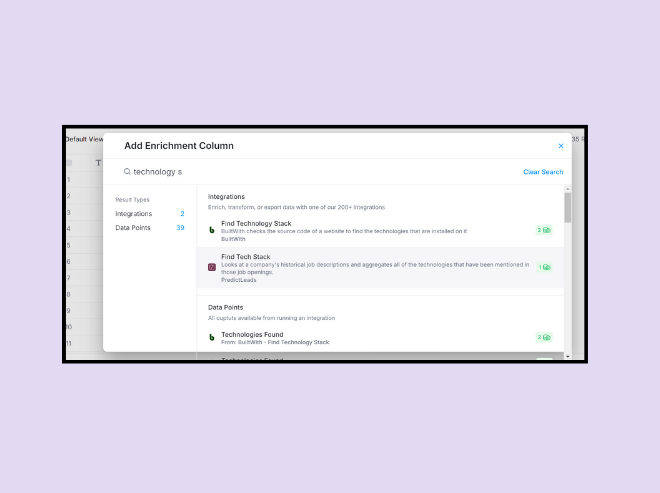
→ The ‘Find Technology Stack’ method helps you find the technology stack of a website by analyzing the source code, including the programming language, frameworks and CMS among others. It’s ideal for scenarios where you want to know a company’s tech strategy in real-time.
→ On the other hand, the ‘Find Tech Stack by Domain’ option uses a company’s historical job descriptions, collecting information about all technologies and frameworks mentioned in those job posts. This method allows you to analyze how a company has changed its technology usage over time, and predict what could be the possible technological direction they’d want to take next.
Now that we’ve got a hang of the two methods, let’s understand how to find technographic data for outreach in Clay in a step-by-step manner:
Using the ‘Find Technology Stack’ option
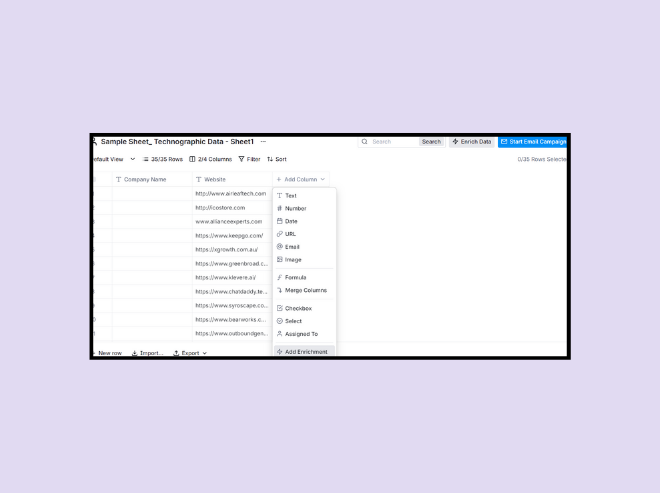
Step 1: To start off, let’s assume that you already have a list of websites you want to check for their technographic information. In order to do this, simply copy-paste the websites onto the Clay table or upload them as a CSV file.
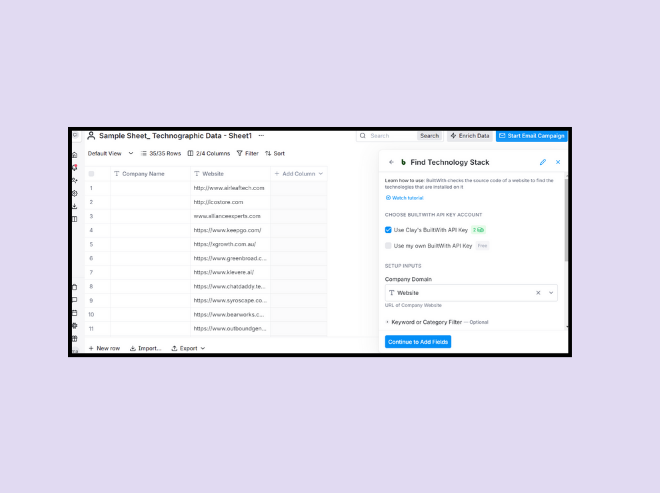
Step 2: In the next step, we’ll need to enrich the list with additional information. To do this, click the ‘Add Enrichment’ option and choose the ‘Find Technology Stack’ option located on the left side menu.
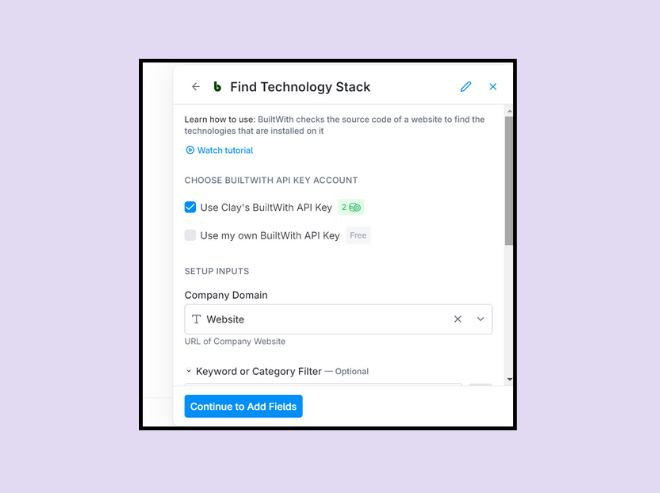
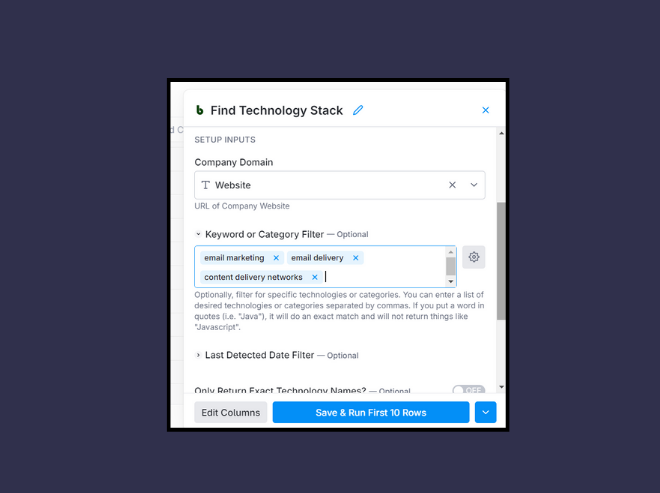
Step 3: Now, under the ‘Actions’ tab, you’ll find the ‘Lookup Technology Stack’ option. Click it and you’ll see a window with multiple options around setting up the inputs. Here, simply tap the ‘Use Clay’s BuiltWith API key’ option and tag the column with website URLs under the ‘Setup Inputs’ section.
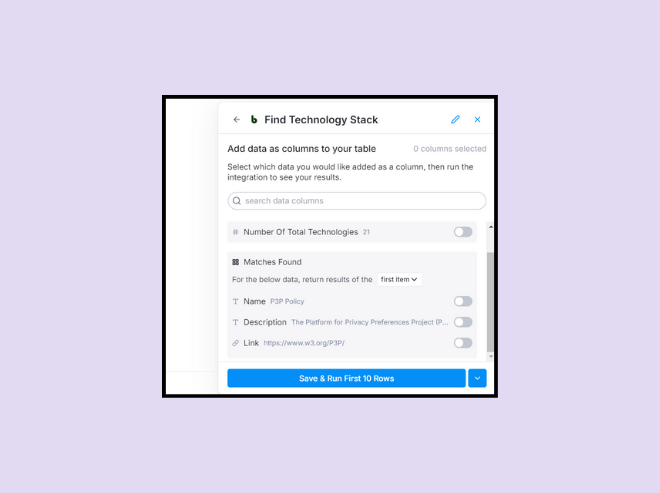
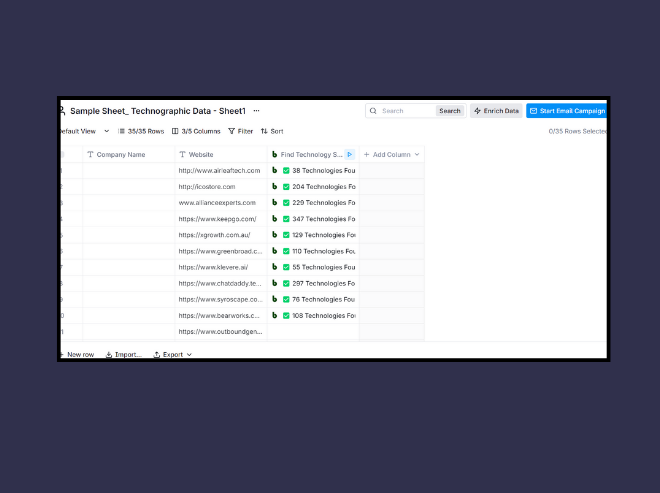
Step 4: To leverage technographic data for outreach, add a column to the table/sheet which displays all technologies found on a website from the list. Then simply click ‘Save and Run’.
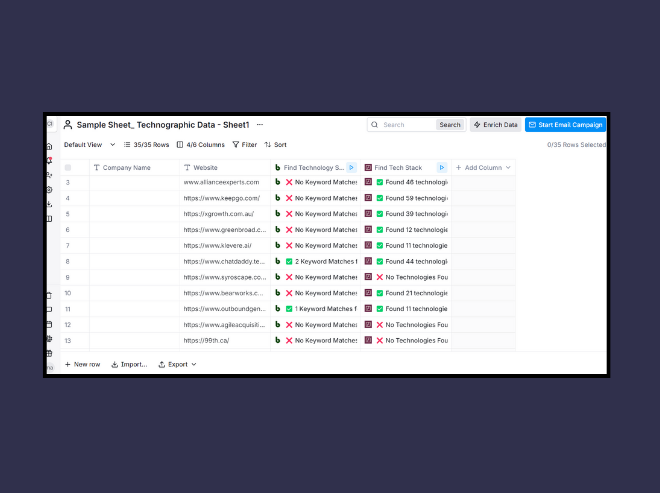
Step 5: Once you’ve run the operation, you’ll see a list of technologies used by a website in the specific column. That being said, there might be scenarios where you want to know what SMS marketing app is commonly used on SaaS websites. You can simply add a category alongside a keyword (like ‘SMS marketing’) to the ‘Keyword or Category’ field and get specific results.
Step 6: The end result would look something like this:
Now that we’ve got an idea of what to expect from the first method, let’s understand what we need to do to find technographic data for outreach using the 2nd method.
Using the ‘Find Tech Stack by Domain’ option
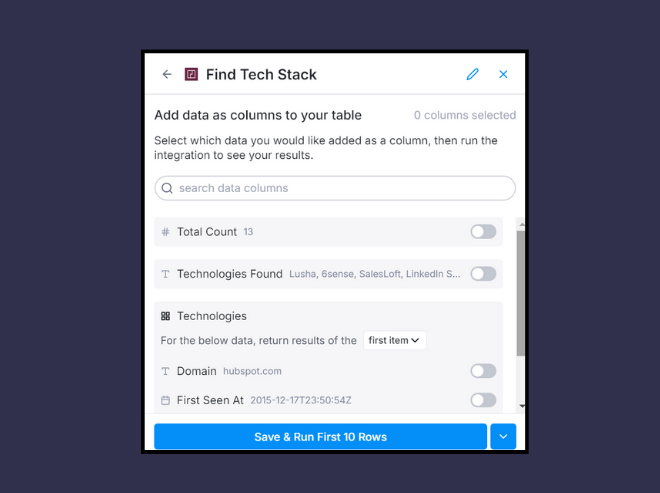
Step 1: The second option for finding technographic data through Clay is to choose the ‘Find Tech Stack’ option within the ‘Actions’ tab.
Step 2: Now, under the ‘Setup Inputs’ section, enter the columns having the website URLs and have the app display all results, leaving the other fields blank. Once you do this, you’ll see a list of technologies used by each website on your Clay table.
Step 3: Similar to the ‘Find Technology Stack’ option to find technographic data for outreach, you can also filter your search further by choosing a specific category, such as ‘Enterprise search’ under the ‘Technology Category’ drop-down.
You’ll then be able to see the results on your table.
So which of the two is better?
Well, both ‘Find Technology Stack’ and ‘Find Tech Stack by Domain’ offer valuable insights but cater to different needs. The real-time data provided by ‘Find Technology Stack’ is perfect for understanding a company's current tech strategy, while ‘Find Tech Stack by Domain’ offers a longitudinal view, ideal for gauging technological evolution.
The choice between these tools depends on whether your outreach strategy benefits more from current snapshots or historical trends.
Method 2: How to Find Technographic Data for Outreach Using A Website Technology Checker?
Another extremely useful method to find technographic data for outreach is to use a website technology checker like BuiltWith. A leading software solution, the 'BuiltWith Technology Lookup' allows users to enter a company website & get an exhaustive list of technologies on the domain as output.
Here’s how to use it for finding high-quality technographic data in real-time:
Step 1: Visit the BuiltWith website and use the search feature to input a company’s website.
Step 2: Once you do this, the tool will return a list of technologies and tools that are part of a website’s tech stack.
Step 3: After getting access to the technology stack of relevant prospect websites, the next step involves collecting these into a sheet for further analysis and outreach.
Now manually copying these results into a Google Sheet can be cumbersome and involves extensive effort.
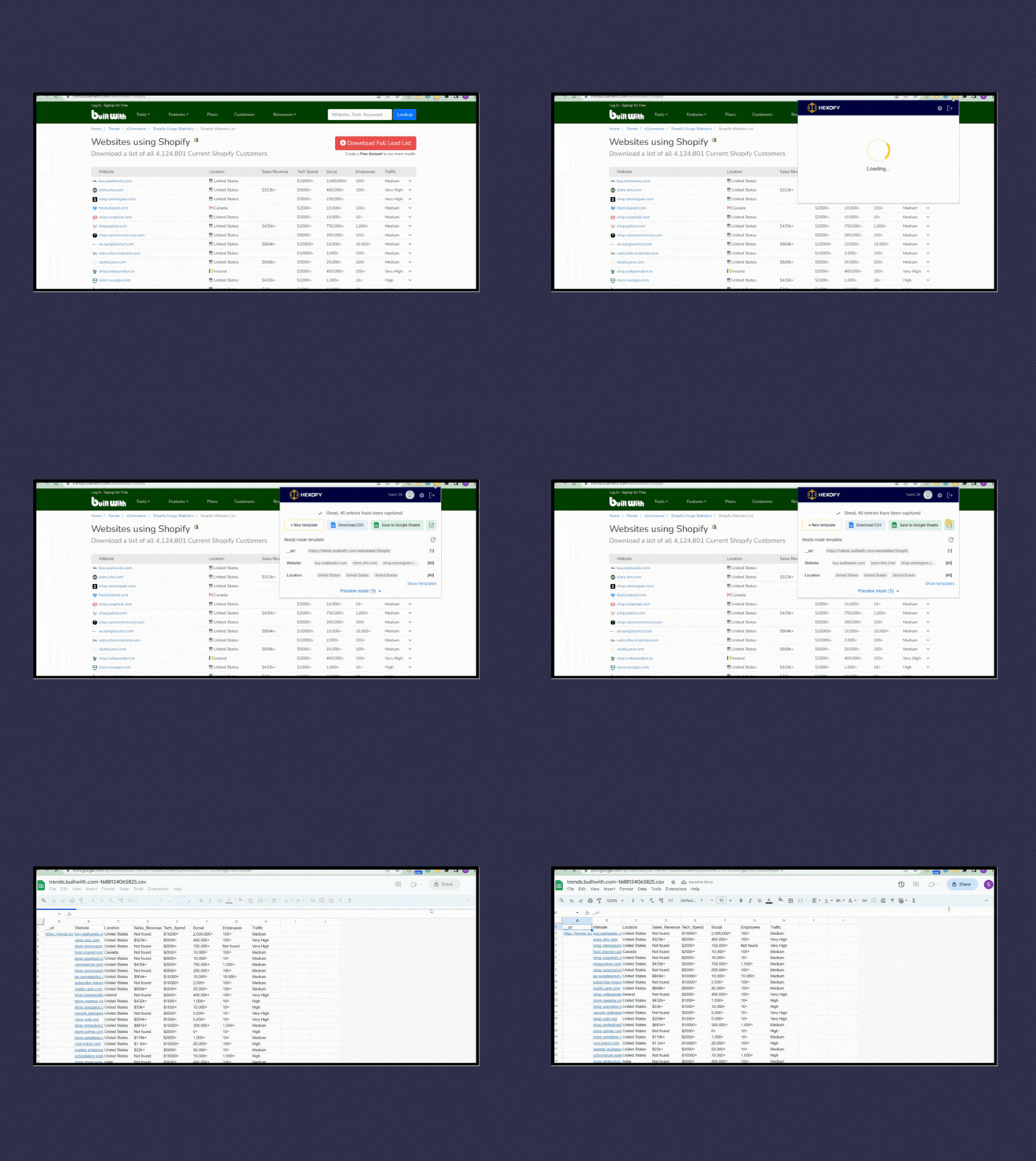
Step 4: You can then use an extension like Hexofy to extract a list of sites and their tech stack through BuiltWith.
Step 5: After downloading the Chrome extension, you can easily capture data from the browsed page in a single click by visiting the BuiltWith website for research.
Doing this will give you a list of websites alongside the relevant technologies they’re using in real-time.
Method 3: How to Find Technographic Data for Outreach Using Social Engineering Methods?
Automated tools offer a starting point, but sometimes the richest insights come from direct human interaction. Most of the above methods rarely identify backend technologies used in case of the following tasks:
Making RESTful API calls
Database persistence
Load balancing
Cloud-based hosting,
And various middle-tier servers among others.
As an alternative, exploring job boards, analyzing career pages for tech skill requirements, or engaging with company developers on LinkedIn can reveal nuanced details about a company’s backend technologies – something that automation could possibly miss.
Such social engineering methods & techniques are extremely useful, helping you find the technologies companies use to power their everyday operations.
Method 4: How to Find Technographic Data for Outreach Using Review Sites?
Another extremely useful method to find technographic data for outreach is to use review sites like G2, Capterra, SoftwareAdvice and more.
The idea behind this is that people often write detailed reviews on these sites about the pros and cons of using a SaaS product. These reviews not only help you from a messaging POV, but also offers intel into which tool is used by a particular company.
You can even find out who was the decision-maker involved in the process at some level.
Both of these insights can then be used as sales triggers to generate more positive responses.
Here’s how to use this method to find technographic data for outreach:
Step 1: Identify key review platforms
Two standout platforms for technographic insights are G2 and Capterra. G2 is renowned for its coverage of high-end, large deal-size software solutions, such as Salesforce, making it an ideal resource for insights into enterprise-level tech adoption. On the other hand, Capterra offers a broader array of software reviews, including smaller deal sizes, but with a vast quantity of data across numerous niches.
Step 2: Conduct vendor search
Next, start by directly searching for your competitors or the specific SaaS tools you're interested in on these platforms. For example, if you’re exploring users of an email marketing tool like Hunter, simply input the name into the search bar of G2.
This will lead you directly to a list of reviews, often accompanied by the reviewer’s name, their likes and dislikes about the software, and occasionally, their company’s name.
Step 3: Leverage the review insights
Now, you need to dive into the reviews to gather technographic data. Many reviewers leave their full name and company, offering a direct line to potential leads who are already engaged with software similar to or competitive with your offering.
This information is particularly valuable as it comes from pre-qualified leads—individuals with budget authority and a clear need for software solutions.
Step 4: Utilize LinkedIn for further research
With the names and companies gleaned from reviews, turn to LinkedIn since it helps you to quickly search for decision-makers who left the reviews, offering an opportunity to personalize your outreach. Mentioning specific aspects of their review, such as features they liked or disliked, can make your pitch more compelling and relevant.
Step 5: Follow the vendors on G2
An often-overlooked feature on G2 is the ability to follow vendors. This enables you to receive notifications whenever a new review is posted, keeping you updated on fresh leads without constant manual checks.
Regularly visiting your notifications area on G2 can become a routine part of your lead generation process, ensuring you never miss an opportunity to reach out to a new reviewer.
Step 6: Exploring similar tools and categories
Both G2 and Capterra allow users to explore software categories or directly compare similar tools. This feature is invaluable for expanding your list of prospects by identifying users of comparable software who may be open to switching to a solution like yours.
Capterra, for instance, allows sorting by “most reviews,” giving you access to a broad list of potential leads interested in specific software solutions.
Step 7: Scraping reviews for Efficient Outreach
While manually copying and pasting information is an option, leveraging scraper tools can significantly streamline this process. Tools like Web Scraper (available on the Chrome store) or Data Miner offer sophisticated functionalities for extracting data from review sites.
However, it's crucial to adhere to the terms of service for each site, as unauthorized scraping may violate their policies.
Here’s a quick video outlining how to do this step-by-step:
Wrapping it Up!
Exploring technographic data for outreach using AI tools like Clay, complemented by some of the other semi-automated & direct social engineering methods, represents a multifaceted approach to understanding the technological landscape of potential clients and competitors.
By tailoring outreach efforts to the specific technological needs of prospects, you can transform the effectiveness of your campaigns, ensuring that the message & offer resonate deeply and drive meaningful engagement.
Now you can take up this process yourself, or leverage Cleverviral's data intelligence solutions, where we use a mix of AI-powered intelligence & our own strategic approach to find high-quality technographic data for outreach.
So if you're looking to outsource this to someone who understands B2B well, simply drop us a line on hi@cleverviral.co or fill out the form on our website with your requirements.
Until then, happy prospecting!!
Frequently Asked Questions
What are the sources of technographic data?
Technographic data, which provides insights into a company's technology usage and digital footprint, can be sourced from a variety of channels. Key sources include:
- Public databases & websites - Third-party data providers - SaaS/B2B product review sites - Social media & forums - API & integration partnerships - Online job descriptions
How do you collect technographic data?
You can easily collect technographic data for outreach using AI tools like Clay, or simply use web scraping through extensions like Hexofy, Web Scraper and Data Miner to dig through large troves of technology stacks to find relevant information about a given prospect.
Free POC
Reading about outbound isn't running it. Want us to run yours?
Apply below. If we're a fit, we run a real pilot on your ICP and show you the actual replies before you commit to anything.